A calculator for left-handed people
Most calculator apps put = and the operators on the right, under a right thumb. Calsee has a left-handed layout that moves them to the left edge, while the digits stay in their usual order.
- Operators on the left
- ÷, ×, −, + and = sit in the left-hand column, the keys you press most, right under your left thumb.
- Digits stay familiar
- 7 8 9 still read left to right. Only the operator column moves, so there’s nothing to relearn.
- One-handed mode, too
- On a wide phone, shrink the keypad toward your left thumb. It works with or without the left-handed layout.
- Every mode, every theme
- The layout follows you into Scientific and Business modes and into every one of Calsee’s generated themes.
- One switch
- Settings › Left-handed layout. Turn it off any time.
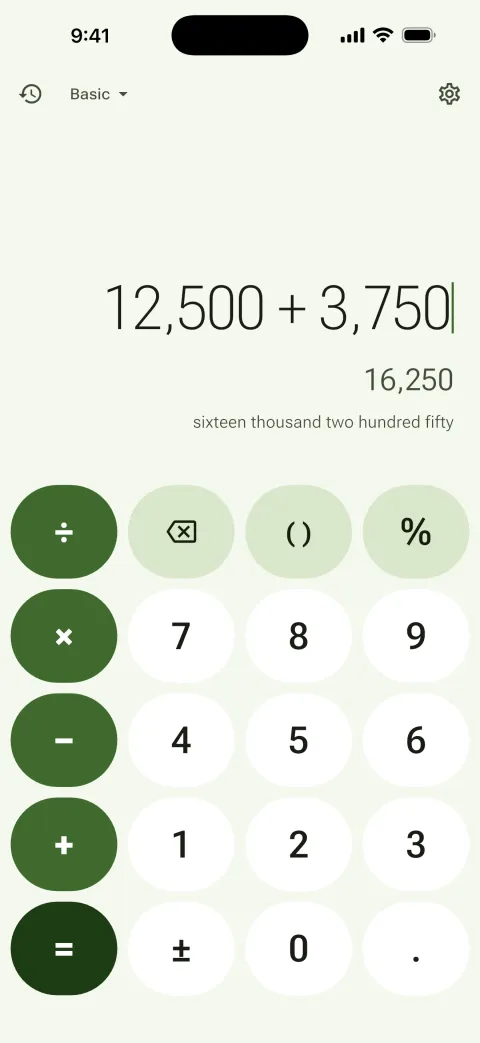
Why a left-handed calculator helps
On a phone held in the left hand, the right edge of the screen is the hardest place to reach. A standard calculator puts the most-used keys there, so left-handed people stretch for = on every sum. Moving that column to the left puts the operators where the thumb already rests, which is quicker, steadier and easier on the hand.
Everything else Calsee does
- Exact arithmetic: 0.1 + 0.2 = 0.3, and 1 ÷ 3 × 3 = 1.
- Every answer written in words, in lakh and crore or million and billion, in English or Hindi.
- Scientific mode, a unit converter and an offline currency converter.
- Business mode with GST keys and cheque wording.
- A new generated theme every time you swipe the display, in twelve styles.
- No ads, no accounts, no tracking. Works offline.

Get Calsee
Free on Android and iPhone. Turn on Settings › Left-handed layout and the operators move to your side.
Questions
Is there a left-handed calculator app?
Yes. Calsee, free on Android and iPhone, has a left-handed layout in Settings that moves the = key and the operators to the left side of the keypad.
Does the left-handed layout reverse the numbers?
No. The digits keep their usual order (7 8 9 across the top). Only the operator column moves to the left.
Can I use it one-handed?
Yes. One-handed mode shrinks the keypad toward one thumb on wide phones, and it works together with the left-handed layout.
Is Calsee free?
Yes. It’s free on Google Play and the App Store, with no ads and no tracking.